
Getting your people to engage with your engagement survey is as much about the employee engagement software and workforce intelligence platform as it is the internal comms plan you roll out.
So what does great engagement or employee sentiment software look like?
Based on what we have learned over the years from conversations with clients, non-clients and users of employee engagement software, here is our list of essentials that you have to have in your workforce intelligence platform.
- Make it easy to use. It hardly needs mentioning that the platform needs to be easy to use by employees. Head Light has taken this ease of use to the next level by incorporating common ‘swiping’ now as a way of progressing through a questionnaire.
- It has to be mobile. An essential. You want your people to complete and update the questions and making it easy for them to do will not only give you a better, more complete view, but also get better engagement (!) with the questionnaire. Of course, you also need it to work just as well on a PC or laptop or tablet.
- Own the colours, the ratings and the language. Make sure your workforce intelligence platform looks and feels like your employee engagement software and not something that you’ve bought it and just included your logo.
- Read the workforce signals. Learn what enables – and what inhibits engagement – and what the priorities are. It’s all very well asking people to rating individual items or statements about how they feel about the organisation and what needs to improve, but it’s as important to know if this actually matters to them. If an area is scoring particularly low amongst employees, you need to then find out if it’s seen as important to people . If it is, then you can take action. If it isn’t, you can focus elsewhere.
These are the workforce signals that organisations need to have visibility of.
- Instant access to what’s trending. Don’t buy into employee sentiment software that only allows you only to run reports at certain times, when criteria are met or when a survey is closed. That’s not how it works nowadays. You’ll want to see what’s happening now, what to prioritise and what’s driving engagement. Equally, you need to see what’s turning people off and becoming an obstacle. That is, you need to see - and read - the signals your employees send.
- Include snapshot surveys - and an annual review too if you wish. We call the on-going assessment of employee sentiment, ‘continuous listening’. It means that you are able to gather feedback from your people throughout the year through continuous signals. You can take the pulse of your organisation, see quickly the impact of initiatives, events or developments in the organisation and see where you need to focus effort. There is also a place for the once-a-year employee engagement survey – so make sure you can do that too.
- Save it and return. Few people will want to complete an employee sentiment survey in one sitting – but they won’t want to start again if they need to dip out. Make sure your engagement platform saves responses as you progress.
- Go beyond ‘the usual’ engagement factors and link them to the business. It’ll make for more meaningful understanding if you’re able to see how engagement correlates with the impact on business performance and you do this by aligning engagement questions with a more business-oriented KPI.
- Look at the perspective - and read the signals. Be able to breakdown the results into the areas that you, the managers or the individuals themselves can so something about. Look for employee sentiment software and a workforce intelligence platform that allow you to do this.
- Drill down to see where the hotspots are. Employee engagement is, by its nature, individual so make sure your online employee engagement tool lets you slice the data as you wish. You may want to look at differences by location, or by working patterns, or department or tenure.
- Be able to pinpoint your star engagement managers. Make sure you can identify your star managers - those leaders that are highly effective in engaging their own staff. They’re important not just for their own teams but as role models for others, and as organisational trouble-shooters.
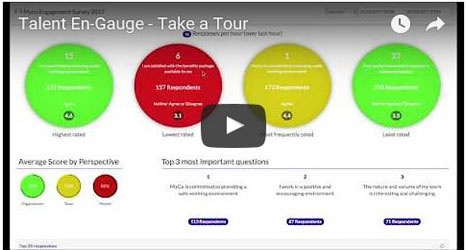
And taking all the above into account, it won’t surprise you that we’ve taken all of this into account with our Talent En-Gauge module of our Talent Cloud workforce intelligence platform.
Take a look now and, when you’ve watched the video, come back to us for a more personalised demo to see how it could work for your organisation.
Get in touch to arrange a demo.
